
















INTELLIGENT COLLECTION SORTING

Smart Sort Master
Automatically sort collection pages based on custom rules. Boost product visibility, push sold-out items down, and increase conversion rates effortlessly with smart collection sorting.
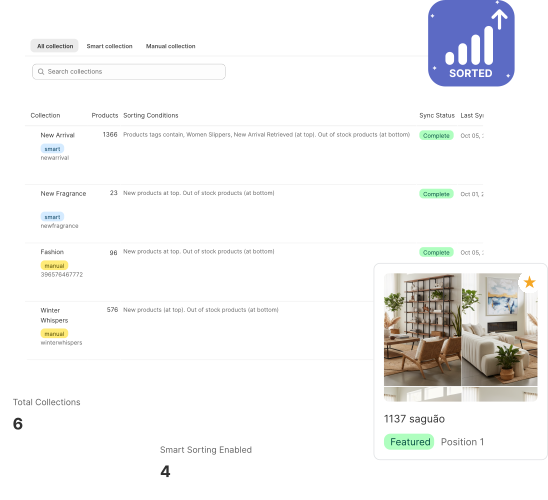
Smart Sorting Made Simple
Everything you need to automatically organize and optimize your product collections
Automatic Sorting
Automatically sort collections based on custom rules including best sellers, new arrivals, out of stock placement, and more
Featured Products
Pin important products to the top of collections with drag-and-drop interface for perfect product positioning
Out of Stock Management
Push sold-out products to the bottom automatically, ensuring customers see available items first
Multiple Sort Criteria
Sort by discount, revenue, price, inventory, tags, brand, date added, or alphabetically with primary and secondary rules
Scheduled Auto-Sync
Collections re-sort automatically at scheduled intervals, keeping your store organized without manual work
Per-Collection Control
Configure unique sorting rules for each collection with granular control over primary, secondary, and remaining product sorting
Multiple Sort Criteria
Choose from 8+ different sorting methods to organize your collections
Best Sellers
Products sorted by number of sales
Discount Percentage
Products with highest discounts at top or bottom
Revenue Generated
Products sorted by revenue contribution
New Arrivals
Recently added products appear first
Inventory Levels
Sort by available inventory quantity
Price Ranges
Sort by price - high to low or low to high
Tag Based
Sort products based on specific tags
By Brand/Vendor
Sort products by brand or vendor name
Set Up in Minutes
Configure your collection sorting rules and let the app do the rest
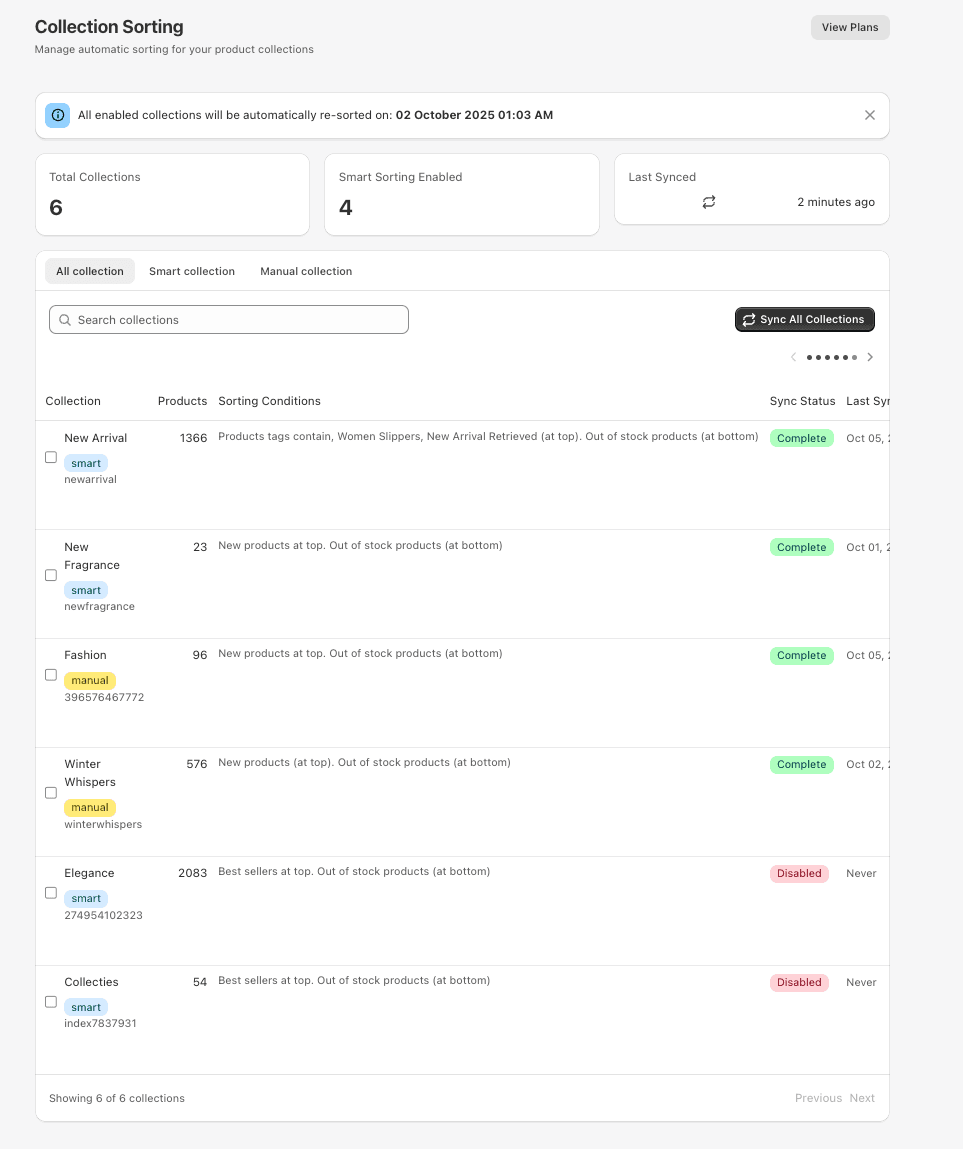
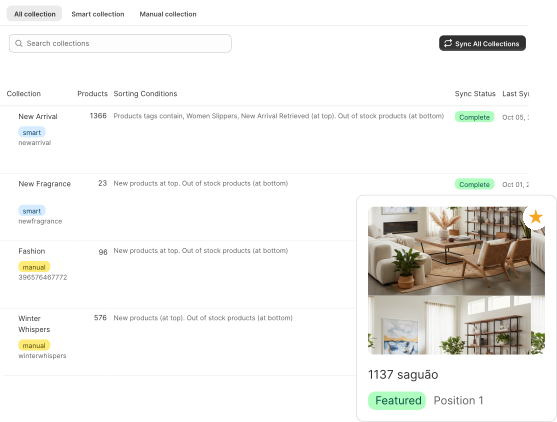
Collection Management Dashboard
View all your collections in one place. See which collections have smart sorting enabled, total product counts, and sync status at a glance
- Overview of all collections
- Smart sorting status indicators
- Last sync timestamps
- Bulk sync all collections
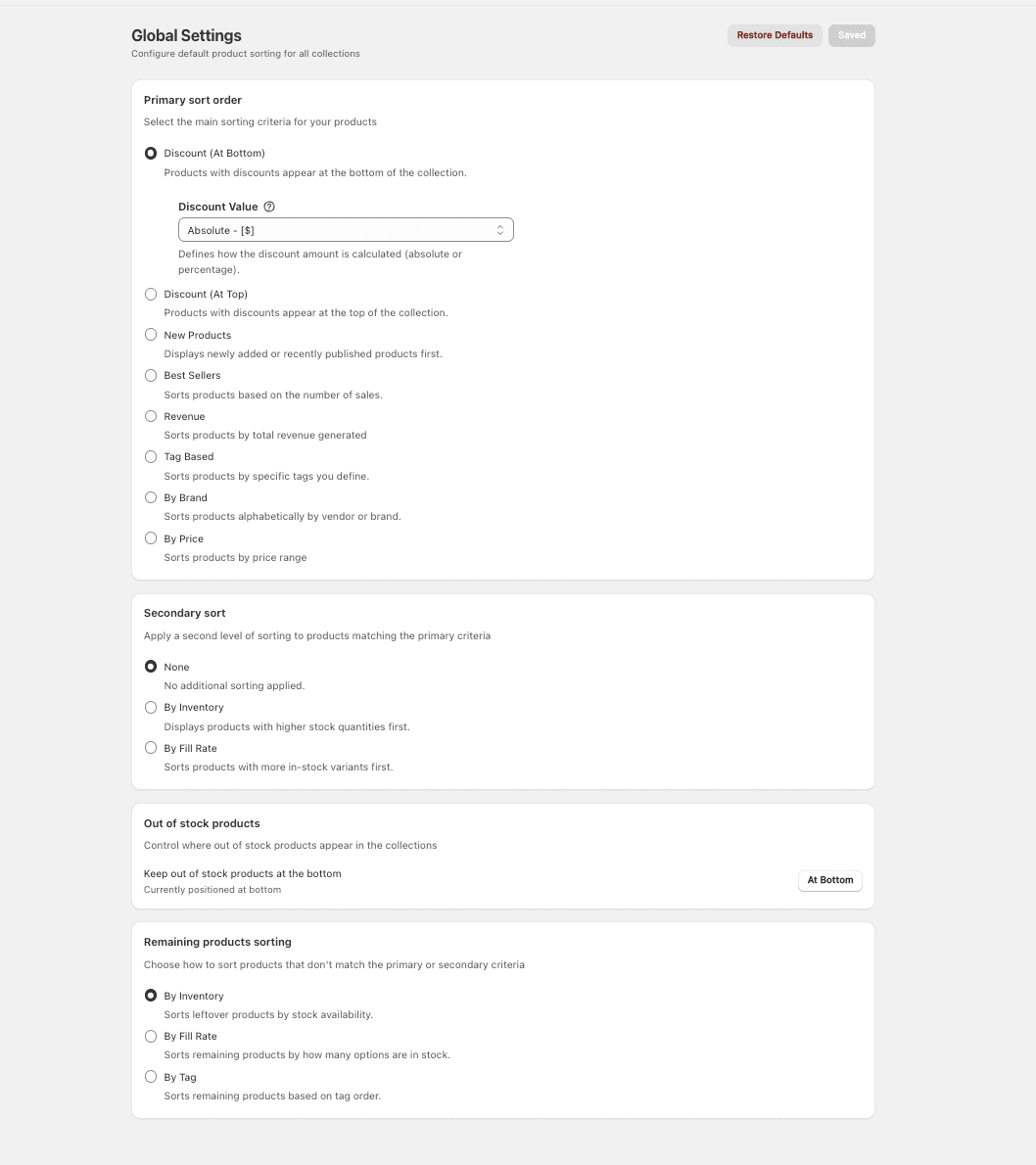
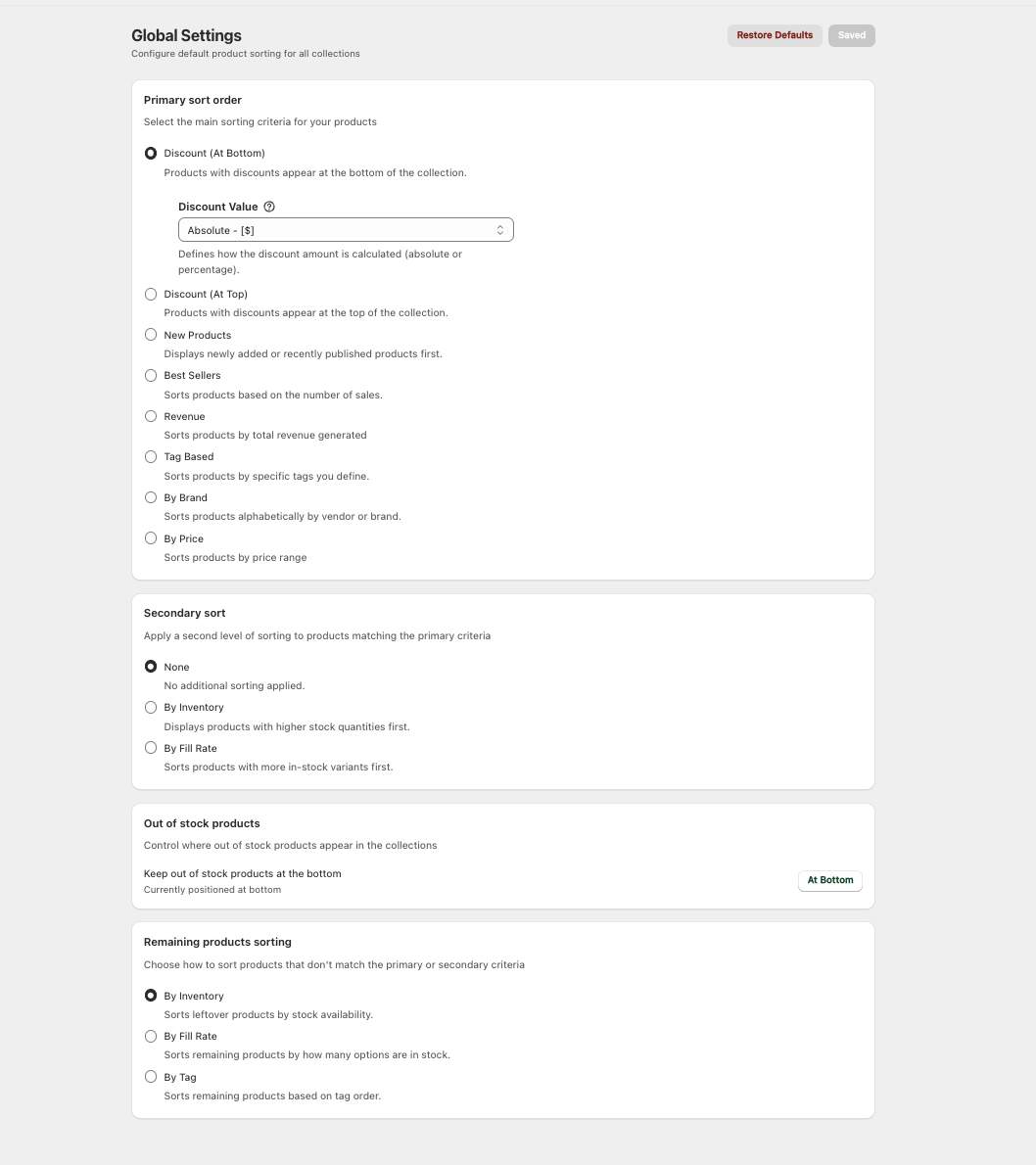
Configure Global Sorting Rules
Set default product sorting for all collections with primary sort order, secondary sort, out of stock handling, and remaining product sorting
- Primary sort order (Discount, New Products, Best Sellers, Revenue, etc.)
- Secondary sort criteria
- Out of stock product positioning
- Remaining products sorting options
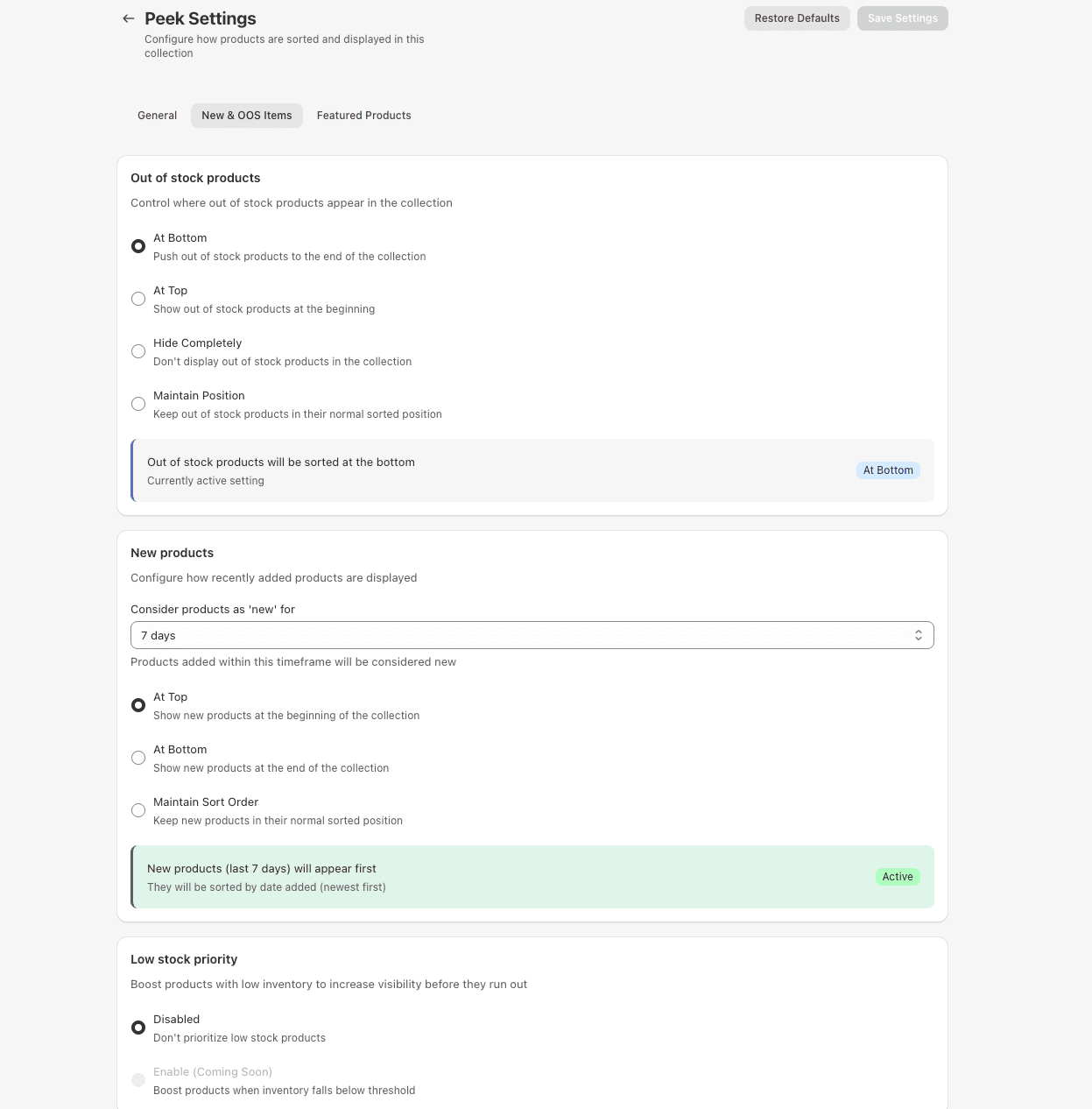
Per-Collection Settings
Override global settings for specific collections. Configure out of stock handling, new product displays, and low stock priority for each collection
- Out of stock products control
- New products positioning
- Low stock priority boost
- Custom timeframe settings
General Collection Settings
Set up custom sorting with primary and secondary criteria. Choose from best sellers, discounts, new products, revenue, tags, and more
- Primary sort order selection
- Secondary sort criteria
- Remaining products sorting
- Enable/disable per collection

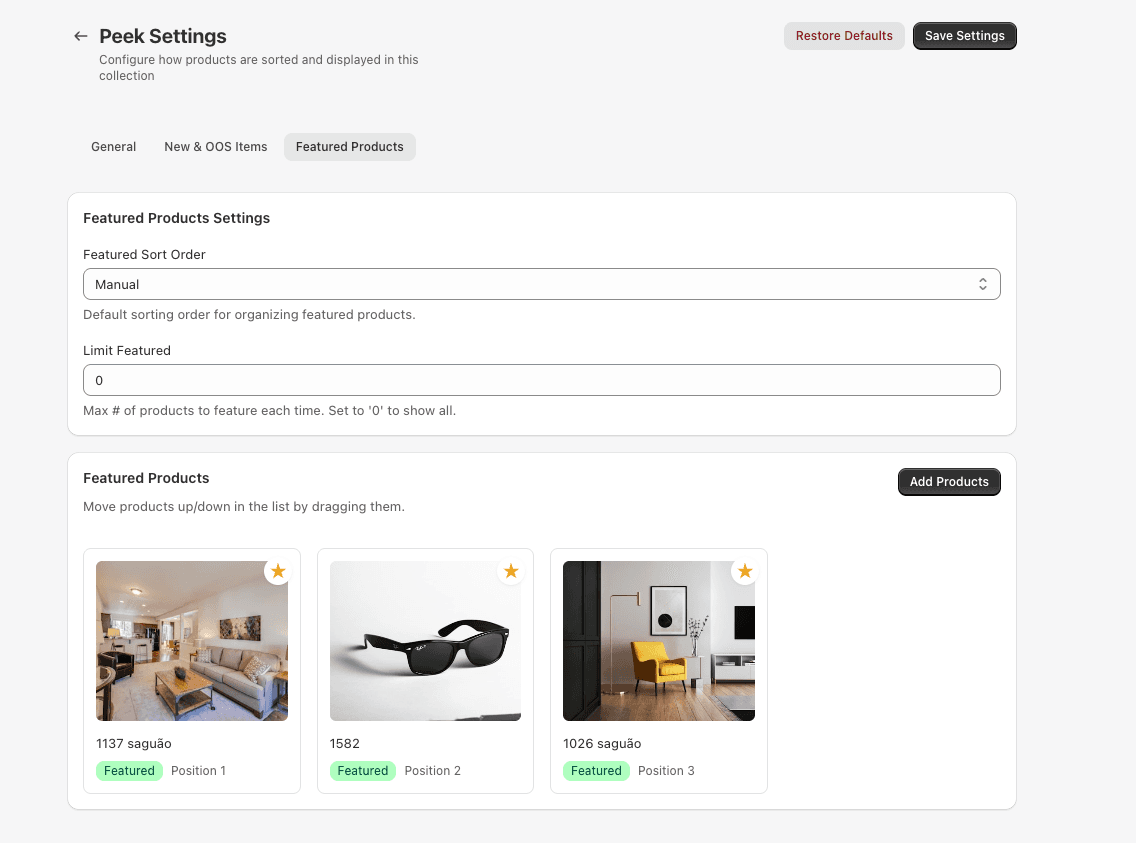
Feature Important Products
Pin specific products to the top of collections with drag-and-drop interface. Set featured product limits and manual ordering
- Drag-and-drop product ordering
- Featured product limits
- Visual product cards
- Position indicators
Why Choose Smart Sort Master?
Automatic collection sorting based on custom rules
Set it once and let the app handle collection organization automatically based on your preferences.
Push sold-out products to the bottom
Ensure customers always see available products first, improving user experience and conversion rates.
Featured products pinning with drag-and-drop
Highlight your best products at the top of collections with intuitive drag-and-drop positioning.
Multiple sort criteria (primary + secondary)
Combine sorting rules for ultimate control over how products appear in your collections.
Scheduled auto-sync at configured intervals
Collections automatically re-sort every 12 or 24 hours depending on your plan, keeping everything fresh.
Per-collection custom sorting settings
Different collections can have different sorting rules to match their specific needs.
Effortless Collection Management
Set custom sorting rules once and let automation handle the rest. Your collections stay organized and optimized 24/7 without any manual work.
Automatic Updates
Collections re-sort automatically every 12-24 hours based on your plan, keeping everything fresh and optimized.
Smart Rules Engine
Combine primary and secondary sorting criteria for precise control over how products appear in collections.
No Coding Required
Visual interface makes it easy to configure complex sorting rules without any technical knowledge.
Loved by Store Owners
See what our customers have to say
"Smart Sort Master takes the hassle out of managing collections. The "push sold-out down" function is a game-changer for our store."
Cougar Clothing
Australia
"We've seen a significant increase in conversions since using the featured products feature. Being able to highlight our best items at the top of each collection is amazing."
Fashion Forward
United States
"The automatic sorting saves us hours every week. Set it once and forget it - the app handles everything automatically."
Tech Gadgets Pro
United Kingdom

Choose Your Plan
Upgrade or downgrade your plan at any time to fit your store's needs
Free
Plan includes:
Products
500
Collections
1
Features:
- ✓No automated sort
- ✓Sort by Discount/New/Best Sellers/Revenue/Tag Based
- ✓Custom collection setting
- ✓Push sold-out down
Silver
Plan includes:
Products
5,000
Collections
20
Features:
- ✓Automated sort every 24 hours
- ✓Sort by Discount/New/Best Sellers/Revenue/Tag Based
- ✓Custom collection setting
- ✓Push sold-out down
Gold
Plan includes:
Products
Unlimited
Collections
Unlimited
Features:
- ✓Automated sort every 12 hours
- ✓Sort by Discount/New/Best Sellers/Revenue/Tag Based
- ✓Custom collection setting
- ✓Push sold-out down
Plan Details
- ✓All plans include access to basic sorting features and manual collection organization
- ✓Upgrade or downgrade your plan at any time with prorated billing
- ✓Cancel anytime with no long-term commitment required
- ✓24/7 customer support available for all paid plans
Frequently Asked Questions
All our apps are available on the Shopify App Store. Search for the app name, click "Add app," and follow the installation wizard. Setup typically takes less than 5 minutes.
Yes! Most of our apps offer a 7-14 day free trial so you can test all features before committing. No credit card required for the trial period.
Absolutely! All our apps are designed to work seamlessly together. Many merchants use multiple apps to create a comprehensive growth strategy. There are no conflicts between our apps.
You can cancel anytime from your Shopify admin by going to Settings > Apps and sales channels, finding the app, and clicking "Uninstall." Your subscription will remain active until the end of your current billing period.
Yes, we take security very seriously. All data is encrypted in transit and at rest. We comply with GDPR, CCPA, and other privacy regulations. We never sell your data to third parties.
All plans include email support. Professional and Enterprise plans get priority support with faster response times. Enterprise customers also get a dedicated account manager and 24/7 support.
We offer email support for all plans, with priority support for higher-tier plans. Enterprise customers get dedicated account managers and 24/7 support.
Yes, you can change your plan at any time from your app dashboard. Changes take effect immediately, and billing is prorated.
Yes! If you have specific requirements or need custom features, contact our sales team at sales@universal-apps.com to discuss enterprise options.
Read the latest from Universal Apps
Push Notification App: Customized Targeted Audience
Discover how push notification apps can transform your Shopify store with customized, targeted messages that boost sales and re-engage customers.
Push Notification Platform: Magnify Sales
How a push notification platform can relocate your previous customers?
Creating a Dynamic Product Feed: Best Practices and Strategies
Why incorporating dynamic product feed app is important in 2023?